Defining the Organization Structure
Overview
The Organization Structure is the foundational hierarchy on which everything else in the TRE Platform Administrator's workflow depends.
Quark's TRE supports multi-level hierarchy. For example, you can define your organizational hierarchy as follows:
- Organization — The top-level entity representing your institution (for example, XYZ Pharma or Research Institute).
- Group — Divisions within the organization (for example, DrugDiscovery or Science).
- Business Unit (BU) or Department — Subdivisions within a Group. The label of this layer is configurable: pharmaceutical organizations typically use Business Unit, while academic and research organizations typically use Department.
The Organization Structure is configured from inside the Budget tab, on the Organization Structure screen.
Steps to Define the Organization Structure
1. Open the Organization Structure screen
- Navigate to Budget in the left-hand Navigation Menu.
-
Open the Organization Structure screen.

2. Create Groups
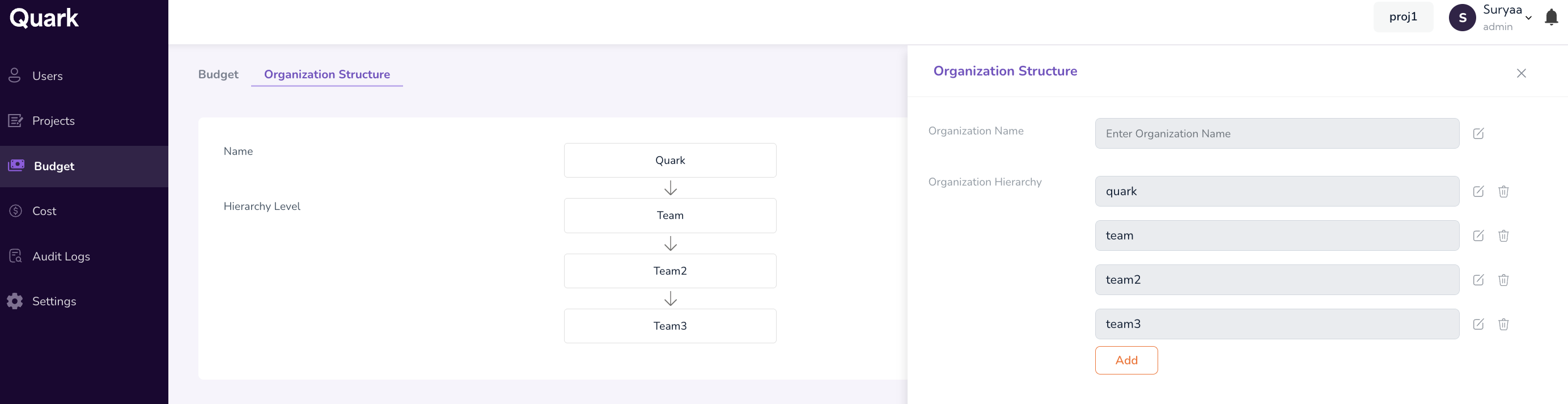
- On the Organization Structure screen, click the Edit button.
- Enter the level Name for each field: Organization Name, and Organization Hierarchy.
- Click Add to define new hierarchical levels.
-
Click Submit when completed.
Example pairings:
| Group | Business Unit (Pharma) |
|---|---|
| DrugDiscovery | OncologyRND |
| VaccineRND | GeneTherapy |
Deleting Organization Entities
When an entity is no longer needed, it must be deleted in dependency order.
- Delete Users before the Business Units or Departments they belong to.
- Delete Business Units or Departments before their parent Groups.
- Delete Groups before the Organization.
What's Next
- Allocating Budgets — With the hierarchy in place, allocate budgets at the different levels.
- Onboarding Users — Once at least one Group and Business Unit/Department exist, you can begin placing users within them.